
Feature #25225
closed
With the blockmode in Template Analyzer the TS-indent is gone
0%
Description
In the Termplate Analyzer in 4.5 the blockmode-option has been removed. See #23711.
With this option the automatic TS-indent was removed also.
Something like:
test {
11 {
wahr = 42
}
nichtwahr = 23
}
won't be transformed to:
test {
11 {
wahr = 42
}
nichtwahr = 23
}
the automatic indent was very useful to format TS.
(Copy from "template analyzer" (with blockmode) and paste in "info/modify")
(issue imported from #M17826)
Files
 Updated by Hauke Haller about 13 years ago
The missing "Block mode", which simply indents the TypoScript code, is described here
http://typo3.org/documentation/document-library/core-documentation/doc_core_ts/4.2.0/view/1/3/#id4144286
as feature of the extension Extension Development Evaluator where its still working. But it was integrated in the core in <4.5.
 Updated by Ernesto Baschny about 13 years ago
- File ts-blockmode-indention-gray-styling.png ts-blockmode-indention-gray-styling.png added
- Target version deleted (
0)
Indeed I just figured out that this was a feature which could have been useful. I would propose that we need to bring it back somehow, but undecided still how.
It cannot be called "block mode": I doubt anyone guesses this idents the TypoScript code. The usability team and also the core team guys that removed that also just saw the "ugly gray backgrounds" without noticing the real benefit of it. You just understand it after reading the documentation (not a good signal...).
I also figured out that the indention level was represented in the background gray level. It went darker the bigger the indention level.
So I propose to re-add this feature simply in the "syntax highlighting" mode, so if this is ticked, the code automatically gets correct indention. You will be then able to copy&paste it again.
I tried to get some "better styling" for the gray backgrounds, but was unable to:
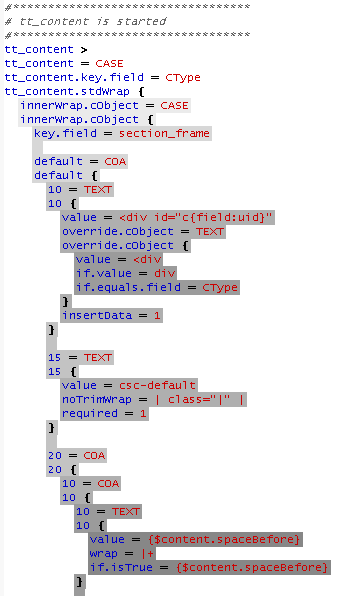
So I guess the most easy solution would be simply to get rid of the gray backgrounds but still do the correct indention.
 Updated by Thorsten Kahler over 12 years ago
+1 from my side, but I'm not 100% sure about it: Can somebody imagine any case where implicit indentation correction in syntax highlighting mode might cause a drawback?
 Updated by Mathias Schreiber over 9 years ago
- Priority changed from Should have to Could have
- Target version set to 7.4 (Backend)
 Updated by Susanne Moog almost 9 years ago
- Target version changed from 7.4 (Backend) to 7.5
 Updated by
 Updated by Georg Ringer over 8 years ago
- Status changed from New to Resolved
the TS looks nice in 7 LTS. therefore I am closing this issue. feel free to open if still valid for you in latest version